
To use the BSO-DOS© protocol for dementia behaviour charting in the app, admin users must first complete the BSO-DOS© protocol set up via the web portal. Learn more in: Protocol and Assessment Tool settings.
- As with assigning any protocols, users can assign the BSO-DOS© protocol to a resident(s) through either Measure, Reminder or Settings from the Menu.
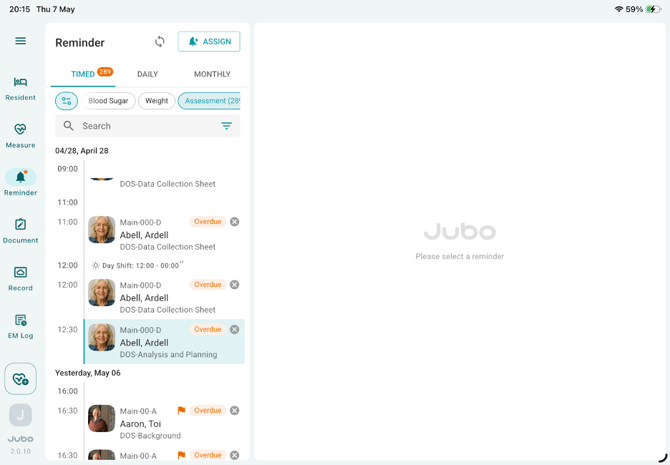
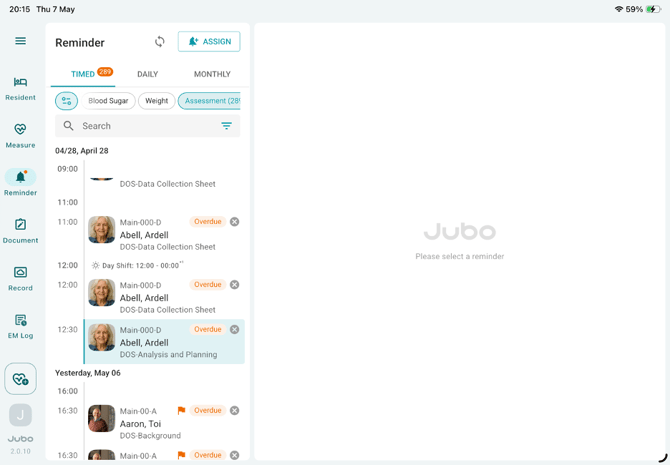
- Once assigned, go to Reminder in the menu and tap the ASMT tab at the top. The BSO-DOS© protocol tasks will appear in chronological order and include the following three categories: Background Information Sheet, Data Collection Sheet and DOS Analysis & Planning. Each category can be identified through the grey subtitles in the reminder task.
I. Background
- After DOS protocol is assigned to a specific resident, first protocol task labelled ‘DOS-Background’ will appear in the reminder list. Tap this task and record the reasons for initiating the BSO-DOS© protocol.
- Select all applicable reasons and tap the Save button to complete the background documentation.
II. Data Collection
- Tap the protocol task labelled ‘DOS-Data Collection’ in the reminder list, where care team members can record Observed Behaviours and the corresponding Contexts during the observed time window. You can select up to six behaviours at a time; context is optional.
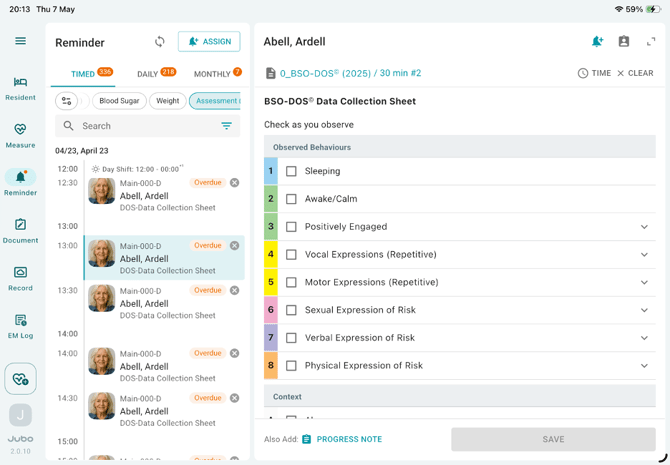
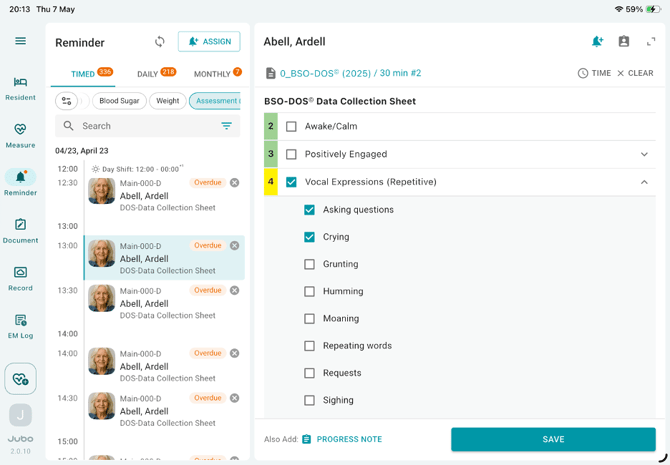
- Tap a behaviour category to expand more options, then select the appropriate items before tapping the Save button.
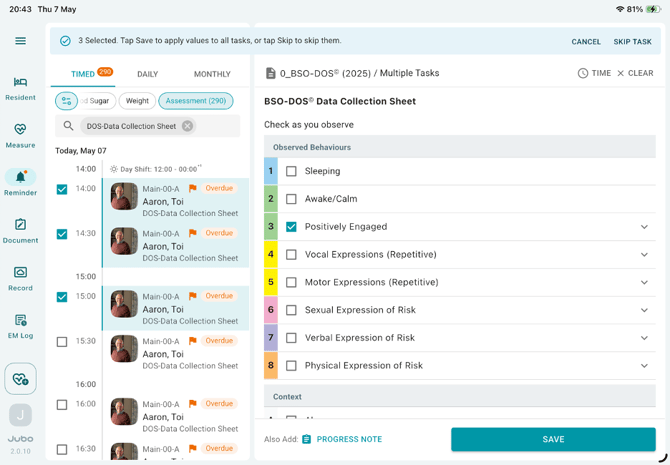
- To bulk record or skip a resident’s BSO-DOS tasks:
-
Press and hold a reminder for a resident.
-
Select one or more reminders using the checkbox.
-
Record the behaviour/context, and tap SAVE.
-
Or Tap SKIP TASK in the top-right corner to skip all tasks.
If any tasks are skipped, the corresponding skip reasons can be viewed directly in the BSO-DOS report PDF on a separate page following the Analysis & Planning section.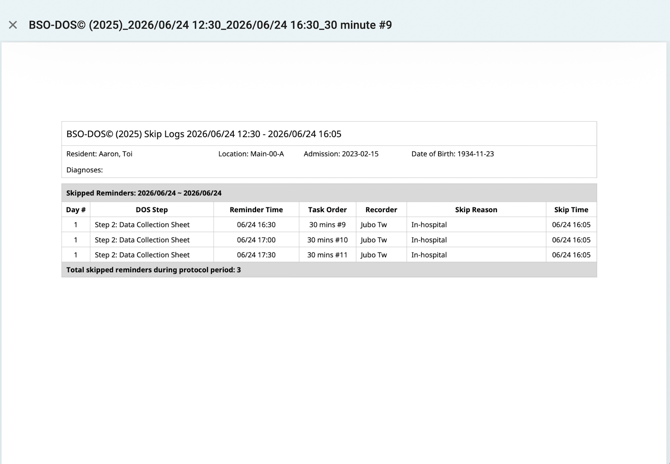
-
- To view the resident’s up-to-date and accumulated behaviour documentation and statistics, tap the protocol title in teal colour located under the resident’s name in the right panel.
III. Analysis and Planning
- Tap on the final reminder task titled ‘Analysis and Planning’.
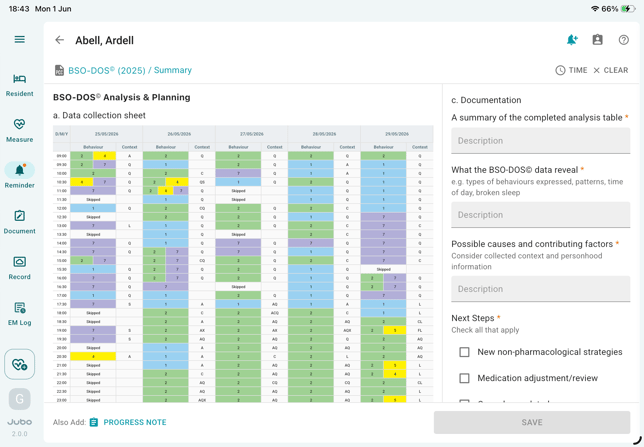
- This will open the Analysis and Planning sheet, where nurses can review a colour-coded summary of the observed data.
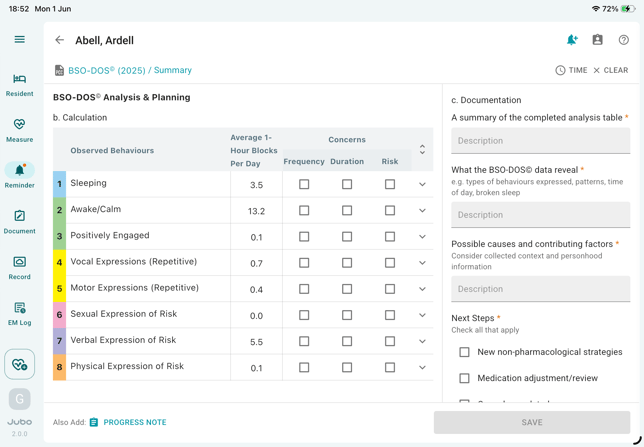
- Scroll down at the left panel to continue to mark the frequency, duration or risks of behaviour categories that might be concerning.
-
In the right panel, users can document findings, possible causes, contributing factors, and next steps to complete the Data Analysis section.
-
Tap Also add PROGRESS NOTE below to include the recorded analysis details in the resident’s progress note via Smart Input feature.
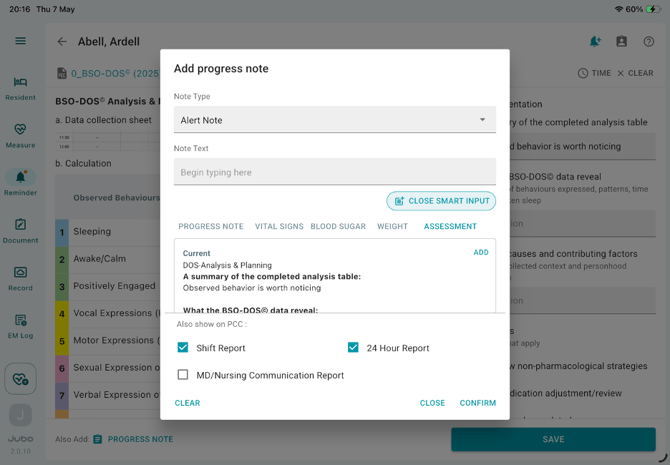
- Finally, tap the SAVE button to complete the protocol. The progress note and protocol summary report will be sent to PointClickCare’s Progress Note and Miscellaneous sections respectively.
Example_BSO-DOSFor an example of a completed BSO-DOS PDF report, refer to the link below.
Note
1. Learn more about BSO-DOS 2025© in the official educational resources: https://brainxchange.ca/BSODOS-Resources
2. Before documenting the DOS Analysis and Planning task, user must first complete the Background information sheet.
3. After completing the DOS Analysis and Planning task, if there are still incomplete Data Collection reminder tasks, those tasks will be marked ‘Skip’ in the corresponding recording cell in the BSO-DOS PDF report.
4.For protocols configured with a specific end date and PDF summary report generation, the summary report will automatically synchronize to PointClickCare (PCC) once the final reminder task is completed. If the protocol remains incomplete after a defined period (10 days after the final reminder), the system will automatically deactivate the protocol and send the summary report to PCC. Any incomplete reminder tasks will be marked as Skipped in the report.