
- Click Protocol Log from the left sidebar menu.
- Use the date filter on top to narrow the date range (e.g., June 1–7) and search keywords such as "Analysis" to identify Step 3 tasks that are pending or overdue.
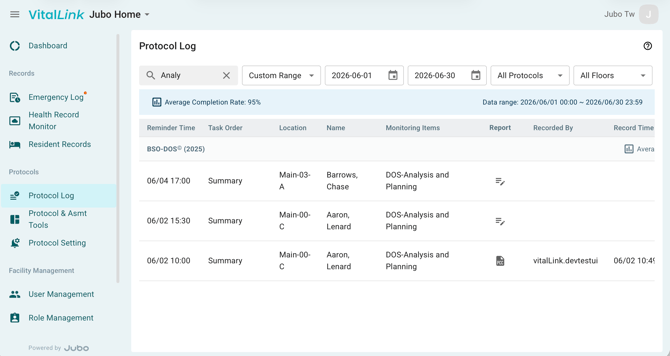
- Click the Edit (pencil) icon under Report column to begin documenting Step 3.
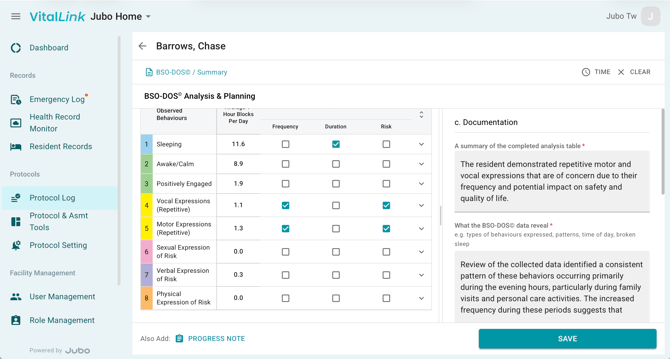
- Scroll down at the left panel to continue to mark the frequency, duration or risks of behaviour categories that might be concerning.
- In the right panel, document the resident’s findings, possible causes, and contributing factors.
- To adjust the workspace, drag the divider between the Behaviour Observation data table and the Documentation section to resize the charting panel.
- Click Also add PROGRESS NOTE below to include the recorded analysis details in the resident’s progress note via Smart Input feature.
- Click SAVE to complete the protocol. The progress note and protocol summary report will be sent to PointClickCare’s Progress Note and Miscellaneous sections respectively.
For an example of a completed BSO-DOS PDF report, refer to the link below.
Note
1. Learn more about BSO-DOS 2025© in the official educational resources: https://brainxchange.ca/BSODOS-Resources
2. Before documenting the DOS Analysis and Planning task, user must first complete the Background information sheet.
3. After completing the DOS Analysis and Planning task, if there are still incomplete Data Collection reminder tasks, those tasks will be marked ‘Skip’ in the corresponding recording cell in the BSO-DOS PDF report.
4- For protocols configured with a specific end date and PDF summary report generation, the summary report will automatically synchronize to PointClickCare (PCC) once the final reminder task is completed. If the protocol remains incomplete after a defined period (10 days after the final reminder), the system will automatically deactivate the protocol and send the summary report to PCC. Any incomplete reminder tasks will be marked as Skipped in the report.