
For facilities with the PointClickCare (PCC) Point of Care (POC) integration enabled, users can complete supported PCC POC tasks directly from the VitalLink app. This allows staff to record measurements in VitalLink while automatically completing the corresponding POC task in PCC.
To enable the PointClickCare POC integration for your facility, please contact Jubo Support.
I. Sync POC Tasks for Your Shift
- In Settings, select the applicable Floor/Unit for the device. This selection is saved on the device and will remain in place after users sign out.
- Tap POC from the left sidebar menu.
- Select the Shift for which you want to complete POC tasks.
- VitalLink will retrieve supported POC tasks from PointClickCare for residents within the selected shift and Floor/Unit.
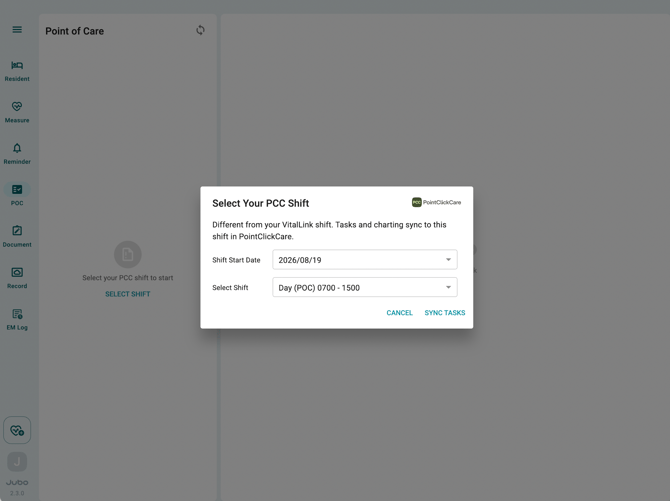
Currently, VitalLink supports POC tasks containing the following measurement types:
- Vital Signs
- Blood Glucose
- Weight
II. Complete POC Tasks
- Use the filter at the top of the task list to switch between Scheduled and QShift tasks. These categories reflect how the POC tasks are configured in PointClickCare.
- Tasks are grouped by status, including Overdue, Due Now, Due Later, and Documented. Overdue and Due Now tasks are highlighted in red and yellow, respectively, to help users quickly identify tasks requiring attention.
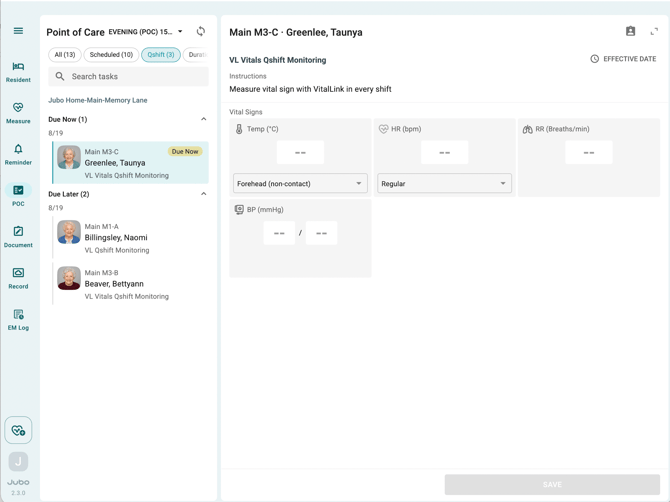
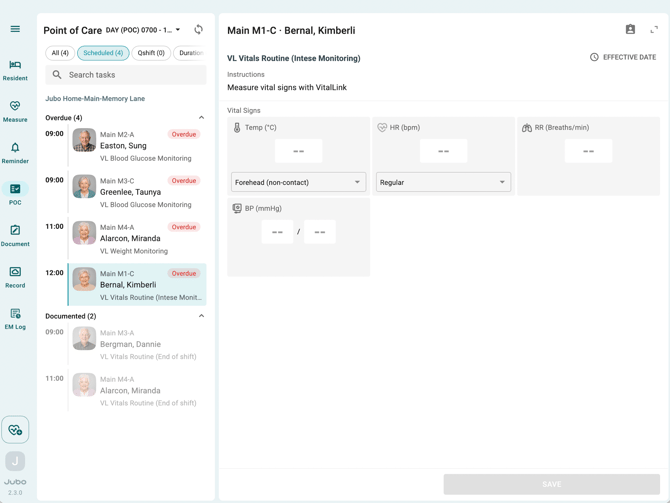
- Select a POC task from the task list.
- Record the required measurements in VitalLink.
- Tap Save to complete the documentation.
- To review the data recorded, go to Record > POC.
Once saved, VitalLink automatically sends each recorded measurement to the resident chart in PointClickCare and completes the corresponding POC task.
Note
- POC task synchronization time depends on the number of residents being synchronized. Where possible, configure each iPad for the applicable Floor/Unit to reduce the number of residents and tasks being synchronized.
- Only POC tasks containing supported measurement types can be synchronized with VitalLink. Currently supported measurement types are Vital Signs (excluding Pain), Blood Glucose, and Weight. If a POC task contains additional unsupported parameters, the task cannot be displayed or completed through VitalLink. When requesting POC integration enablement, please review your existing POC task configuration with the Jubo Support Team to ensure compatibility.
- As of August 26, 2026, some POC workflows are not yet supported due to PointClickCare API’s limitations. These limitations have been reported to PointClickCare and may be addressed in PCC's future updates. Currently:
- N/A options, such as Resident Not Available, are not supported.
- Pain charting is not supported.
- Blood Oxygen (SpO₂) values cannot currently be sent back to POC.
Additional information will be provided as PointClickCare updates its API capabilities.