
- Click Default Threshold Settings in the left sidebar menu.
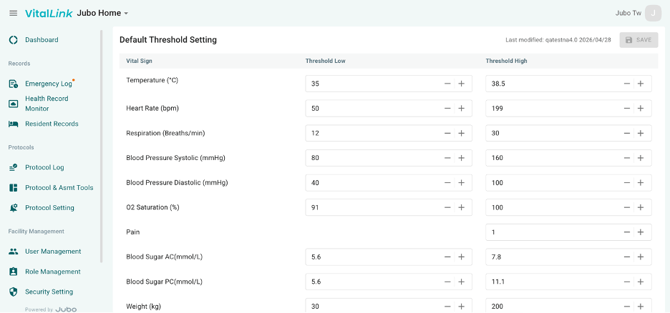
- Using the +/- buttons, or by typing, edit the facility-wide Low and High thresholds for vital signs, including: Temperature (°C), Heart Rate (bpm), Respiration (Breaths/min), Blood Pressure Systolic (mmHg), Blood Pressure Diastolic (mmHg), O2 Saturation (%), Pain, Blood Sugar AC (mmol/L), Blood Sugar PC (mmol/L), Weight (Kg)
-
- Click Save.
Once set up, the values recorded outside of these thresholds will be highlighted in red colour in both VitalLink app and web portal.
Note
1. The units of the parameter are automatically synced from the clients’ PointClickCare environment.
2. To configure an individual threshold for a resident, go to the Resident Record module.