
- Tap Reminder from the left sidebar menu.
- Select the Assessment module under the Timed tab.
- Select a Head Injury Routine task from the reminder list.
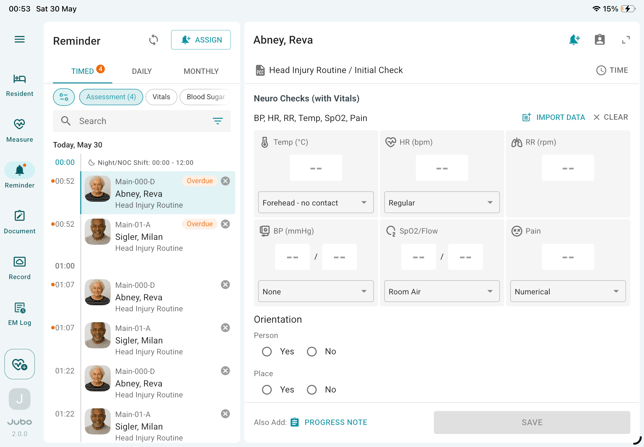
- Required measurement items will appear above the vital signs input section. Record vital sign data by:
-
Using Bluetooth-enabled devices to auto-populate measurements,
-
Manually entering values by tapping each input field, or
-
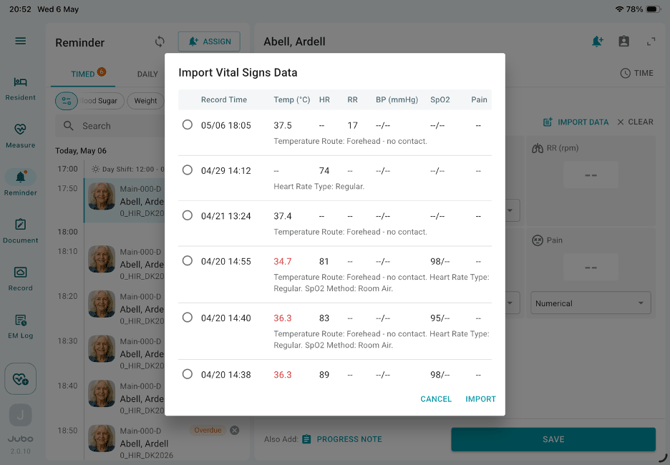
Tapping the Import Data icon to select recent measurements.
-
- Scroll down to complete the associated Head Injury Routine assessments.
- Adjust the execution time using the Time icon, if needed.
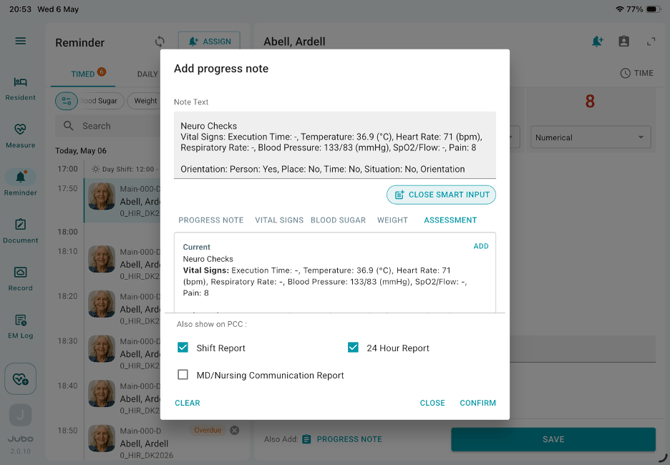
- To add a progress note, tap Also Add: Progress Note. The Smart Input feature will include all recorded data from the current session.
- Tap Save to complete the documentation.
Once the resident’s first reminder is completed, you can review the accumulated assessment progress and details in subsequent reminders by tapping the protocol name (highlighted in teal colour) under the resident’s name at the top of the documentation panel.
Notes
1. Admin users can configure the Head Injury Routine protocol in the VitalLink Web Portal under Protocol and Assessment Tools.
2. A Head Injury Routine task is only available for residents who have been assigned this protocol. Refer to the Assigning Protocols section for more details.
3. The assessment PDF report can be uploaded to the resident’s Miscellaneous tab in PCC. The timing and frequency to send the report can be configured in the VitalLink Web Portal at Protocol Setting.
4. After saving the reminder task:
- Vital sign measured will sync to Vital Signs/Weight in PointClickCare (PCC).
- Progress notes will sync to the Progress Notes module in PCC.
5.For protocols configured with a specific end date and PDF summary report generation, the summary report will automatically synchronize to PointClickCare (PCC) once the final reminder task is completed. If the protocol remains incomplete after a defined period (10 days after the final reminder), the system will automatically deactivate the protocol and send the summary report to PCC. Any incomplete reminder tasks will be marked as Skipped in the report.