- Click on Health Record Monitor from the left sidebar menu.
- Click on Vital Signs, Blood Sugar, Weight, Assessment, or Progress note tabs to review documentation records.
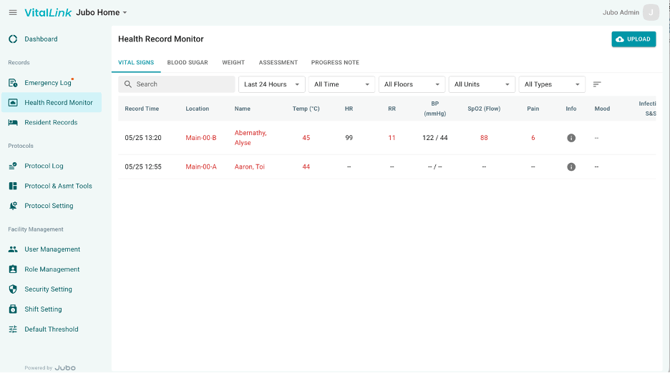
- Use the Search, Date range, or Floor/Unit filters to adjust displayed if needed.
- Within each module, records are organized into the following columns:
- Record Time
- Location
- Resident Name
- (Data Set) - Displays the recorded data for the selected module, such as Vital Signs, Blood Sugar, Assessments, or Progress Notes.
- Protocol - Indicates whether the documentation was completed as part of an assigned protocol.
- Report - Allows users to review protocol-generated PDF reports and verify whether they are configured to upload to PointClickCare (PCC). Reports configured for PCC synchronization will display a PCC label on the report icon.
- Record By
- Upload Status - Indicates whether the documentation has been synchronized to PointClickCare (PCC).
- If documentation still needs to be synchronized to PointClickCare (PCC), the icon under the Upload Status column will display a status such as Pending, Failed, or Restricted, click UPLOAD at the top-right corner to manually sync the data to PCC (See Syncing Data to PointClickCare for more details.)
The detailed upload status for each record is displayed in the Upload Status column, including:
|
|
Upload Status |
Description |
|
|
Uploaded |
The data and progress notes have been uploaded to VitalLink Web and successfully sent to PointClickCare (PCC). |
|
|
1.Saved in VitalLink |
Saved in VitalLink only: The data and/or progress notes have been saved in VitalLink Web only, because according to the Protocol Setting → Send Report to PCC configuration, there were no items requiring upload to PCC. • Mood or Infection S&S data cannot be uploaded to PCC since there are no corresponding fields in PCC. • For any tasks configured as a Protocol, individual reports can still be selected and manually uploaded, providing flexibility to meet the documentation requirements of each facility.
|
|
|
2.Upload pending |
The data and/or progress notes have been uploaded to VitalLink Web but not yet sent to PointClickCare. This may happen if the record creator isn't using a PCC account, or if manual upload is enabled in settings. Please ask an authorized user to upload it via the VitalLink Web.
|
|
|
Failed |
The data and/or progress notes have been uploaded to VitalLink Web but failed to send to PCC. Tap the icon to check the reason.
|
|
|
Restricted |
The data and/or progress notes have been uploaded to VitalLink Web but couldn’t be sent to PCC due to insufficient PCC permission. Tap the icon for details and next steps.
|