
- Tap Measure from the left sidebar menu.
- Select the Vital Sign tab at the top of the resident list.
- Select a resident from the list.
- Adjust the measurement input type as needed using the dropdown menu available under each measurement parameter.
- Temperature input types: Oral, Rectal, Tympanic, Axilla, Temporal Artery, Forehead - no contact.
- Heart Rate input types: Regular, Irregular – new onset, Irregular – chronic, Irregular – UTD onset, UTD – Unable to Determine, Not Applicable.
- Sp02 input types: Room Air, Oxygen via Nasal Cannula, Oxygen via Mask, Trach, CPAP, BIPAP, High Flow Oxygen, Vent.
- Blood Pressure input types: Standing L-arm, Standing R-arm, Sitting L-arm, Sitting R-arm, Lying L-arm, Lying R-arm, other.
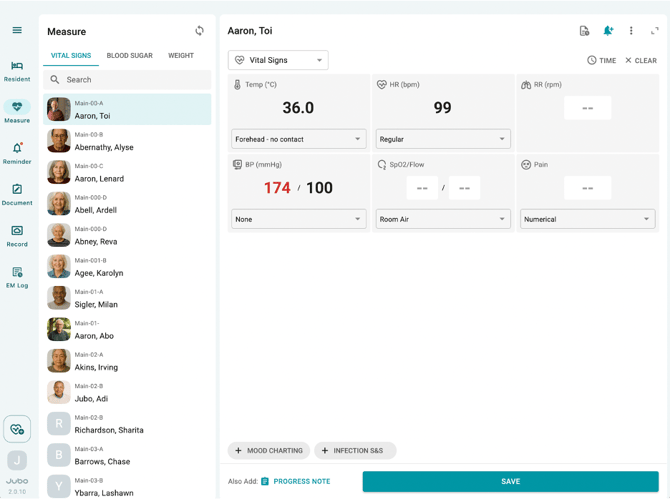
- Review other data, and tap Save to complete the recording.
Note
1. Each of the default input types can be configured in app’s Settings > Measurement Default.
2.These input types are synchronized from the PointClickCare (PCC) EHR configuration and cannot be created or modified within VitalLink.