
I. Measure Resident’s Weight
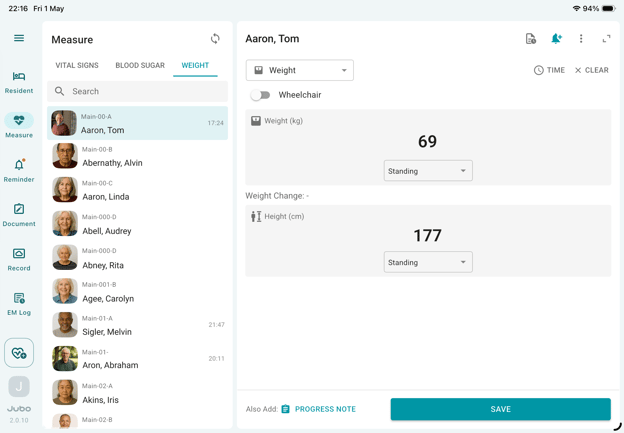
- Tap Measure from the left sidebar menu.
- Select Weight module at the top of the resident list.
- Select a resident from the list.
- Record weight by using Bluetooth-connected devices to auto-populate values; or
manually entering values by tapping the data entry field. - Record Hight by tapping the height data entry field.
- To Edit a recorded entry, double tap the field to make changes.
- Tap Save to complete the recording.
II. Measure Weight with a Wheelchair
- To measure a resident in a wheelchair, enable the Wheelchair toggle above the weight input field.
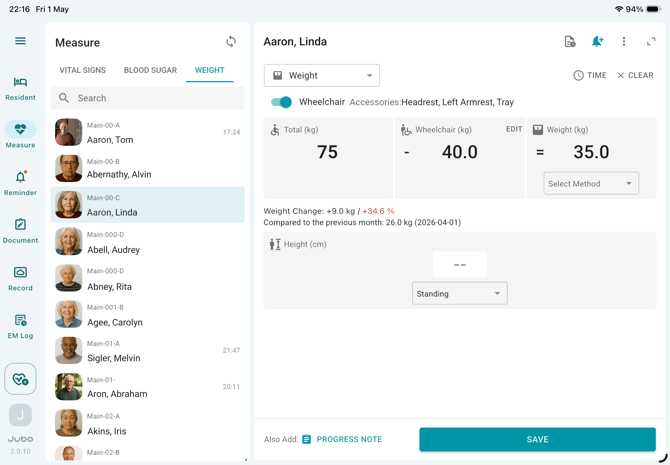
- To configure wheelchair weight and accessories:
- Tap the Wheelchair section.
- Select the applicable accessories and enter their weights.
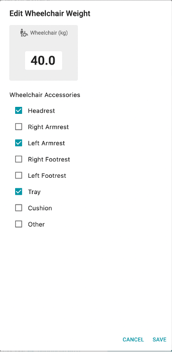
- Once configured, the wheelchair setup will be saved for future measurements for that resident. The system will automatically calculate the resident’s net weight using:
Total Weight – Wheelchair Weight = Weight
After entering a weight value, any changes in the resident’s weight will be displayed +/- kg/lb and percentage (%) when comparing to the latest weight measurement taken record from the 1st to the 10th of the prior month. This weight change information can also be added to a progress note by using SMART INPUT feature.