
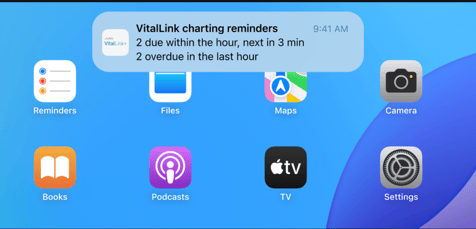
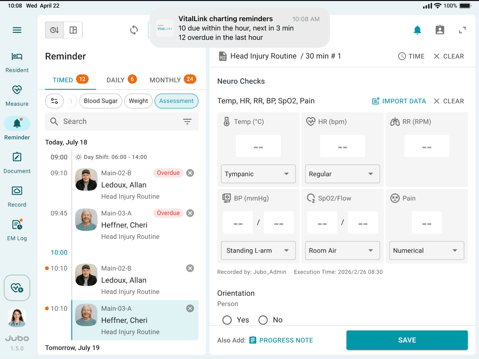
Stay on top of scheduled care and follow-up tasks without signing in to the VitalLink app. When protocol reminders are configured, VitalLink sends an hourly notification summarizing tasks due within the next hour and tasks overdue from the previous hour.
There are three notification settings:
- Push Notifications — alerts when VitalLink is in the background or closed (on by default)
.png?width=479&height=268&name=Push%20notification%20(lockscreen).png)
- In-App Notifications — pop-ups while VitalLink is on screen (on by default)
- Notification Sound — plays the Jubo Chime with background notifications (on by default)
To configure notifications setting:
- Tap hamburger menu icon (☰) from the left sidebar menu.
- In the Device section, tap Notifications.
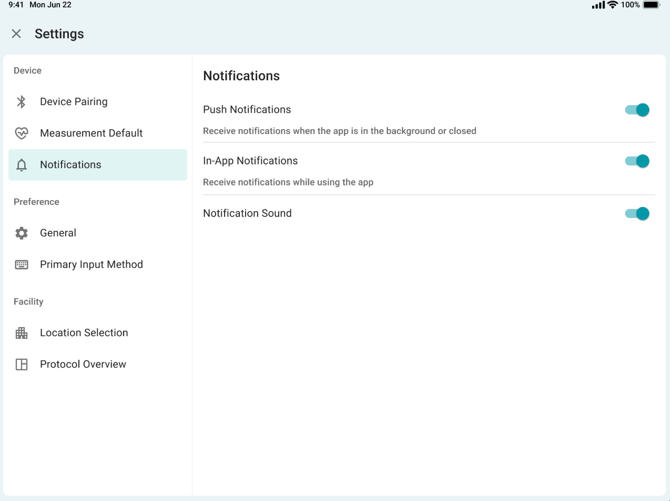
- Toggle the settings on or off
- Push Notifications - control alerts while VitalLink is in the background or closed.
- In-App Notifications - control pop-ups while VitalLink is open on screen.
- Notification Sound - turn the chime on or off.
- If you see the message "Notifications for this app are turned off in your device settings", tap Open Settings (or Turn On) to enable VitalLink notifications in iOS.
Note
1. Notifications are sent once per hour, 24 hours a day — but only when there are reminders due in the hour ahead or overdue from the hour before.
2. Each device receives notifications based on its configured Floor/Unit assignment, which typically corresponds to where the iPad or Edan trolley is located. Devices without a Floor/Unit assignment receive notifications for the entire facility.
3. Notification settings are saved on the device and apply to everyone who uses it. Logging out or switching accounts does not reset them.
4. iOS settings take priority: if VitalLink notifications are off in the iPad's iOS Settings, no notifications arrive regardless of the switches in the app.