
I. Skip a Reminder
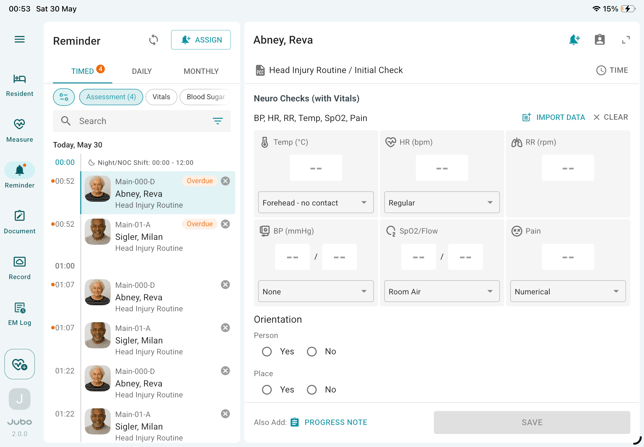
- Tap Reminder from the left sidebar menu.
- Tap the Skip icon (X) on the task you want to skip.
- Select a reason for skipping:
- Choose from the predefined options, or
- Select Other to enter a custom reason
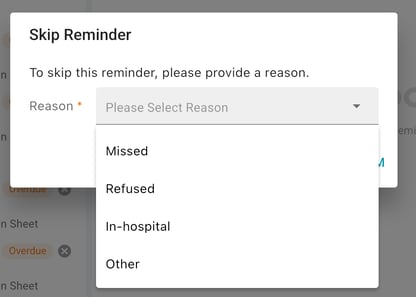
- Tap Confirm to complete skipping this task.
II. Bulk Skip Reminders
Bulk skip is supported for BSO-DOS protocol reminders only.
- Press and hold a reminder on the iPad for a resident.
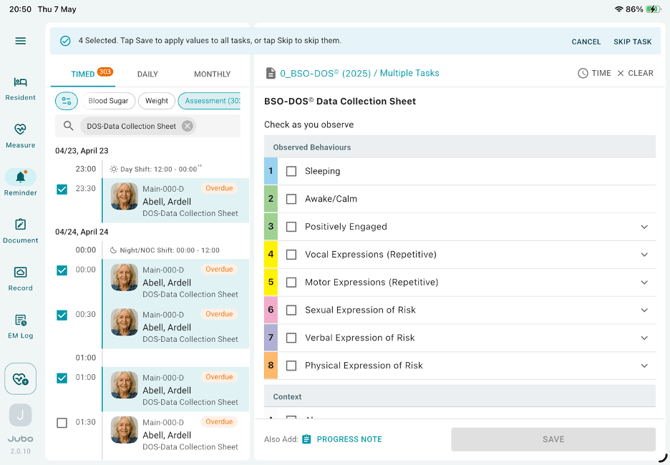
- Select one or more reminders using the checkboxes in front of the resident profile picture.
- Tap SKIP TASK in the top-right corner.
- Follow steps 3–4 in Section I to complete the action.
Note
Skipped reminders will be marked accordingly in the protocol PDF report.