
If a protocol PDF is not syncing to PCC, check the Upload Status in Health Record Monitor page in the web portal to view the upload error messages, and click the icon to see more details. The most commonly seen reason is:
The user does not have sufficient permissions in PCC EHR
Data syncing may fail if the user’s role in PCC EHR does not allow writing or adding PDF file in Miscellaneous section.
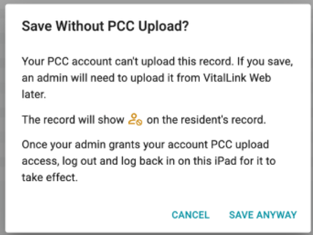
During use of the VitalLink app, the user will receive an immediate notification of this issue upon tapping the Save button and can report it right away.
Solution:
A PCC admin user could
- Go to PCC EHR → Admin → Setup → Security Roles
- Review the user’s role profile
- Under Clinical tab, ensure the role has at least Read / Add permissions for the Miscellaneous module
- Have the user log out of the app and then log back in for the setting change to take effect