
BSO-DOS includes three sections, and these sections are usually completed by different care roles.
- Step 1 – Background (usually by Registered Nurses or BSO nurses)
- Step 2 – Data Collection (usually by PSWs or caregivers)
- Step 3 – Analysis & Planning (usually by Registered Nurses or BSO nurses)
Admin user can configure task visibility by role, so users only see the reminders relevant to them, following the steps below.
I. Verify User Roles
-
Log in to the VitalLink Web Portal with an Admin account.
-
Click User Setting.
-
Review the users account involved in documenting BSO-DOS.
-
Ensure the correct role is assigned to each user account in the Role column.
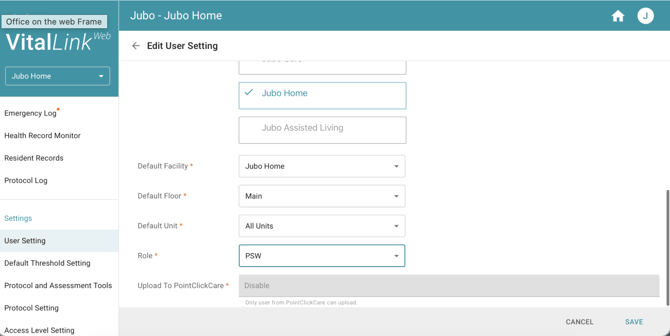
II. Check Access to BSO-DOS
- Click Access Level Setting.
- Click the user roles that are involved in documenting BSO-DOS.
- Confirm if the roles involved have the right access in ‘Accessible Assessment’.
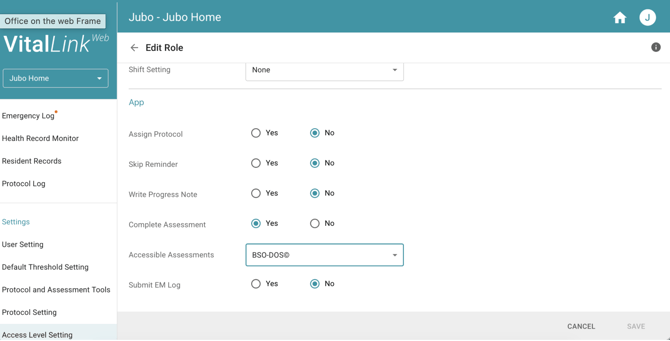
Default system settings:
- PSW roles can access BSO-DOS.
- Registered staff roles can access all assessments, including BSO-DOS.
III. Open the BSO-DOS Protocol and Set Task Visibility by Role
- Click Protocol Setting.
- Select BSO-DOS (If BSO-DOS is not listed yet, go to Protocol and Assessment Tools to enable it).
- Scroll down to the Assessment Section.
- Locate the Assessment for different sections and update task visibility by clicking ‘Executed by’ and select the roles in the drop-down list.
- Click Save to complete the setting.
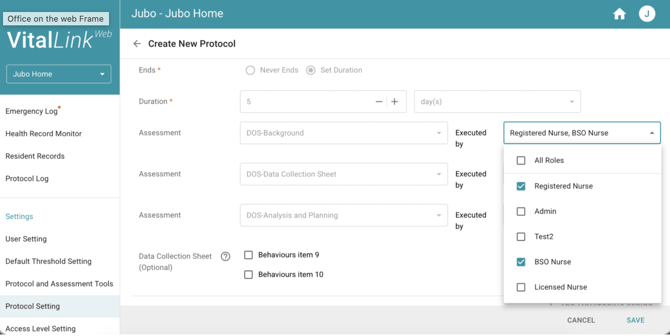
Note: Protocols cannot be edited while assigned to residents. Before making changes:
- Ensure all active BSO-DOS assignments are completed.
- Update the protocol before starting the next BSO-DOS cycle.