![Jubo_Logo_web_200px.png]](https://help.jubohealth.com/hs-fs/hubfs/social-suggested-images/Jubo_Logo_web_200px.png?height=40&name=Jubo_Logo_web_200px.png)
To assign:
- Click on Setting in the left sidebar menu.
- Click on Protocol tab.
- Select a Protocol.
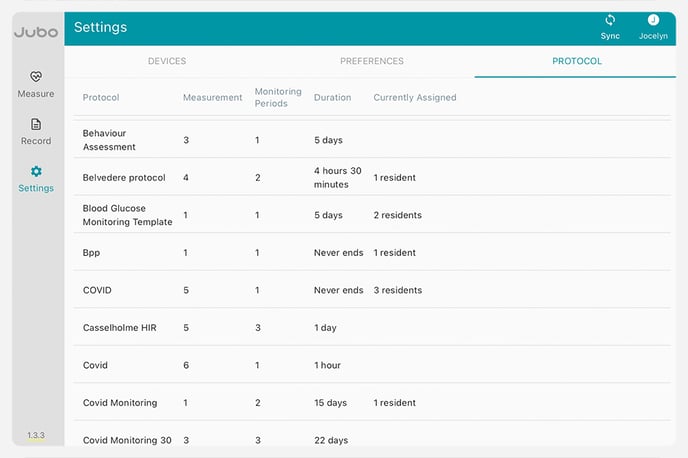
- Select + ASSIGN
- Select + Resident.
- From here, use the dropdown to select either
Resident - to assign specific resident's
Floor - to assign full floors
Unit - to assign full units
Facility - to assign full facilities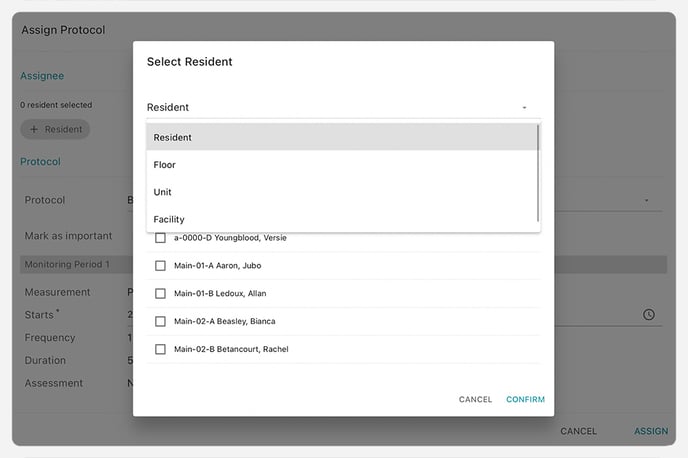
- Click ASSIGN.
To deactivate:
- Click on Setting in the left sidebar menu.
- Click on Protocol tab.
- Select a Protocol.
- Select DEACTIVATE ALL or click
 button to deactivate from specific Assignees.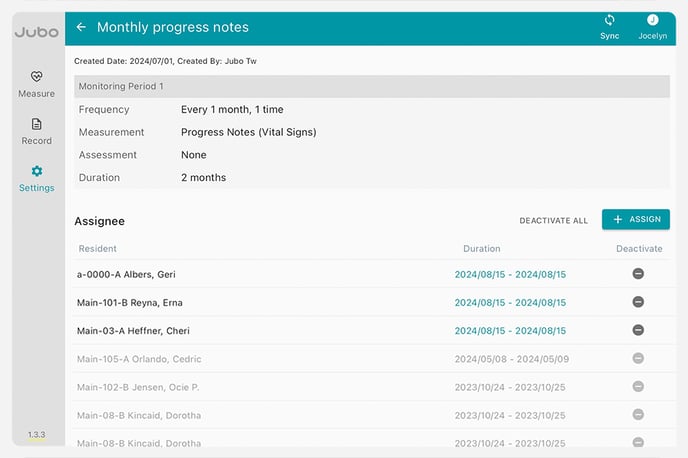
To see these steps in action, take the tour below: