![Jubo_Logo_web_200px.png]](https://help.jubohealth.com/hs-fs/hubfs/social-suggested-images/Jubo_Logo_web_200px.png?height=40&name=Jubo_Logo_web_200px.png)
- Click on Measure in the left sidebar menu.
- Click on the Vital Signs tab.
- Click on + Infection Signs and Symptoms.
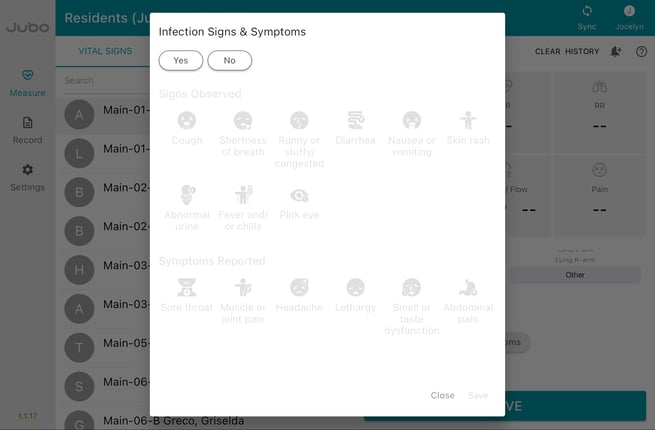
- Click Yes and add all signs and/or symptoms that apply.
Signs include: Cough, Shortness of Breath, Runny Nose, Diarrhea, Vomit, Skin Rash, Abnormal Urine, Fever and/or Chills, and Pink Eye
Symptoms include: Sore Throat, Muscle Pain, Headache, Lethargy, Smell and Taste Disorders and Abdominal Pain. - Click Save to save signs & symptoms.
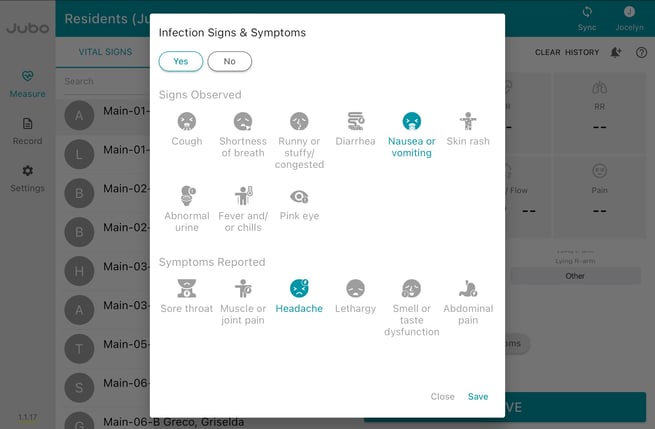
- Click Save to upload record.
Learn more about viewing Infection Signs & Symptoms on the dashboard here.
Note: To edit Infection Signs and Symptoms before saving, click + Infection Signs and Symptoms and make applicable changes; edits cannot be made once the record is uploaded.
Note: This feature does not integrate with the Infection Tracking Module on PointClickCare.
00:49 - Charting infection symptoms