![Jubo_Logo_web_200px.png]](https://help.jubohealth.com/hs-fs/hubfs/social-suggested-images/Jubo_Logo_web_200px.png?height=40&name=Jubo_Logo_web_200px.png)
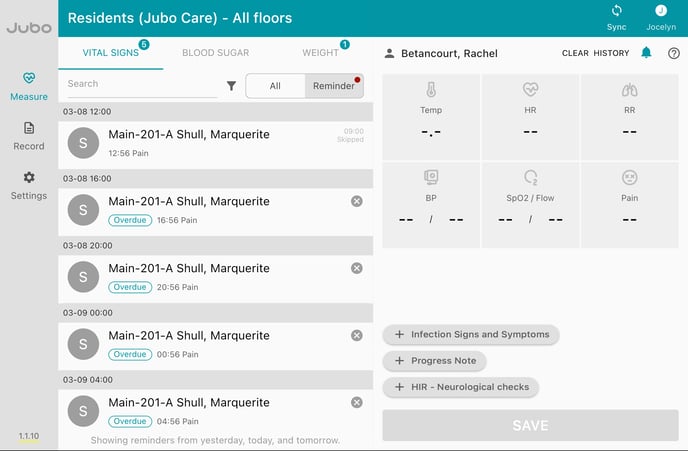
- Click on Measure in the left sidebar menu.
- Click on the Reminder tab.
- Click on the resident’s reminder.
- Take / Input the measurement(s) if needed.
- Click + HIR Neurological checks.
6. Fill in assesment.
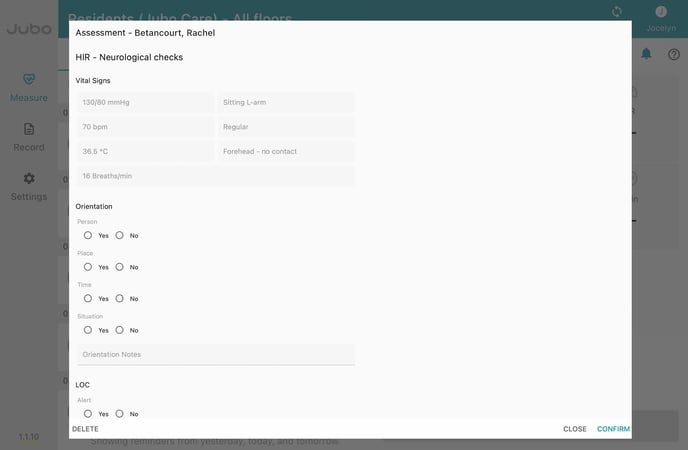
7. Click Confirm.
8. Click Save to upload.
Note: An HIR - Neuro Check will only be available for a resident that has been assigned one. To learn how to assign one follow these steps.
Note: Vitals will auto-populate in the assessment if done before opening the assessment.
Note: A PDF of the assessment will sync to a resident's Miscellaneous tab in PointClickCare.
Find out how to create a Head Injury Routine (HIR) Neurological Check Protocol here.