![Jubo_Logo_web_200px.png]](https://help.jubohealth.com/hs-fs/hubfs/social-suggested-images/Jubo_Logo_web_200px.png?height=40&name=Jubo_Logo_web_200px.png)
- Click on Records in the left sidebar menu.
- Click on Vital Signs, Blood Sugar, or Weight & Height tab and review the list of measurements taken that day.
-
Click on date range selection to modify period for review, if required.
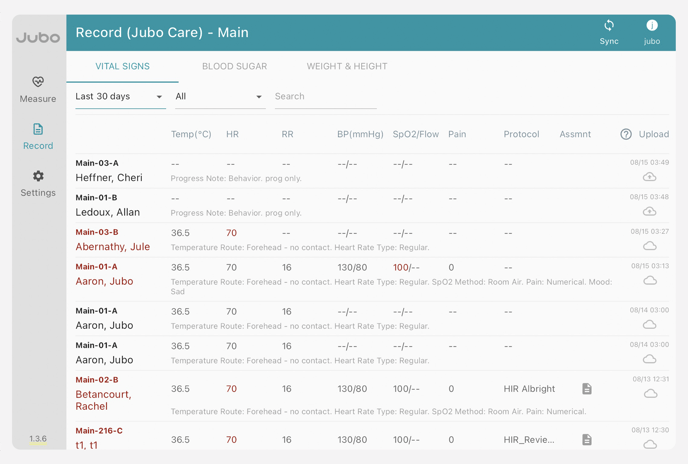
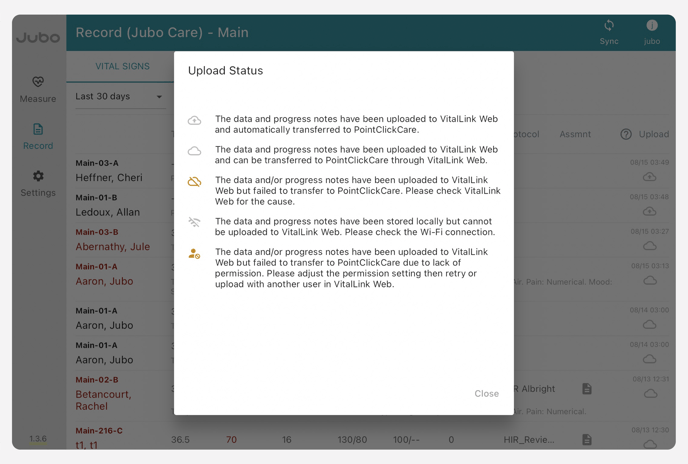
From here you will see what data has and hasn’t been synced to PCC.
 = Ready to Upload/Not Synced
  = Synced
Measurements, progress notes, and infection symptoms input with PointClickCare sign-in credentials will sync directly to PointClickCare.
Measurements, progress notes, and infection symptoms input without PointClickCare sign-in credentials will need to be reviewed on the VitalLink Web Portal before syncing to PointClickCare.
4:56 - Measurement records